
Flux BitterSweet Pro - Download

* Prices incl. VAT
Free shipping
Delivery: after payment received
- Order number: 108974
Orders placed until 14 pm - Same Day Delivery

Would you rather speak with the MusoTec team? You'll find the contact options above!
Flux BitterSweet Pro - Download
A frequency-dependent transient designer that shapes transients and sustain within a selectable frequency range, working like a dynamic equaliser.
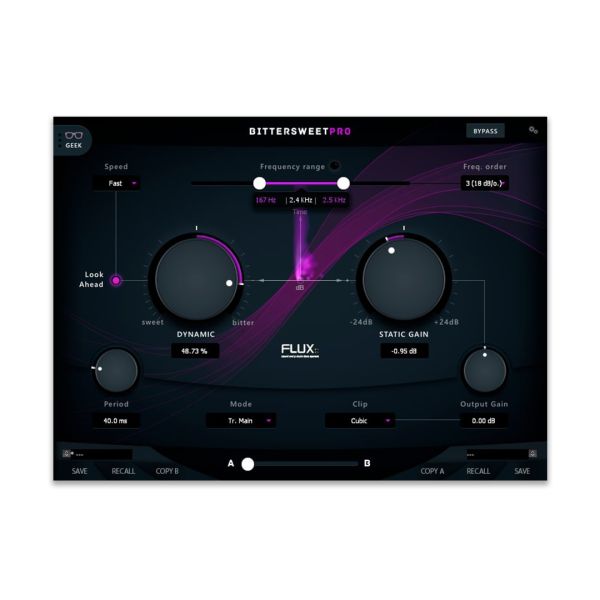
BitterSweet Pro is the evolution of BitterSweet, the well-known transient processor from FLUX::, and can process just a certain part of the frequency spectrum. This makes it act like a dynamic equaliser driven by transients and/or sustain, giving you extended control over transient shaping. Both the processed frequency range and the correspondingly filtered detector side chain can be auditioned at the click of a button, while Dynamic Gain boosts or reduces transients and sustain between Sweet and Bitter. For fine-tuning, attack, hold and release, three speed modes and a Geek pane with advanced envelope parameters are on hand.
Features
- Processing of a selectable frequency range that can be auditioned at the click of a button
- Detector side chain with low cut, high cut and band pass filters, also auditionable
- Dynamic Gain for transients and/or sustain from -100 % (Sweet) to +100 % (Bitter)
- Attack, hold and release plus three speed modes (Fast, Medium, Slow)
- Static Gain and Output Gain with ±24 dB each, soft clipper at the output
- Up to 8 channels, Geek pane, preset manager and automatable morphing slider
Technical details
- Type: Plug-in (transient designer)
- Operating systems: Windows, macOS
- Plug-in formats: VST2, Audio Unit (macOS only), AAX
- Architecture: 64-bit
- Licensing: iLok (computer-bound or iLok USB key)
System requirements
- macOS 10.12.6 Sierra or later
- Mac Pro 1.1 and Mac Pro 2.1 are not supported
- Windows 10 (64-bit) or later
- Windows: graphics card with full OpenGL 2.0 support required
- Windows: with ATi or NVidia graphics cards, install the latest drivers from the ATi or NVidia website
The licence is registered with the manufacturer at https://www.flux.audio/knowledge-base/how-to-redeem-a-license-activation-code/. You will receive your serial number and the download link by e-mail immediately after purchase.