
Flux Ircam HEar - Download

* Prices incl. VAT
Free shipping
Delivery: after payment received
- Order number: 108976
Orders placed until 14 pm - Same Day Delivery

Would you rather speak with the MusoTec team? You'll find the contact options above!
Flux Ircam HEar - Download
A binaural encoding plug-in for faithfully monitoring stereo and surround mixes with up to 16 channels, including Dolby Atmos, on a pair of conventional stereo headphones.
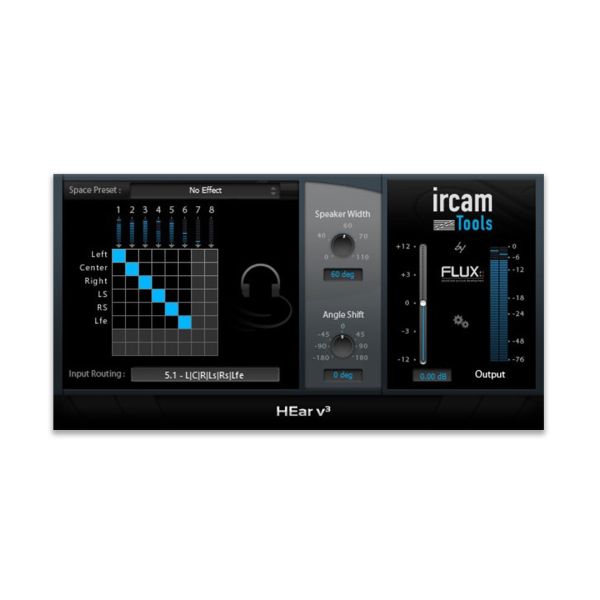
Ircam HEar uses proven technology to model the phenomena that occur when audio is played back through a loudspeaker system, while preserving the three-dimensional localisation of sounds. Its HRTF filters are based on measurements made with the KEMAR dummy head and torso simulator, and Space presets offer a range of spaces with subtly different colourations. A routing matrix maps the inputs from the DAW track to the internal virtual speakers, Speaker Mode sets the emulated speaker configuration, and Speaker Width and Angle Shift adjust the stereo width and listening angle. The result is intended for headphone listening only, not for a conventional stereo loudspeaker setup.
Features
- Up to 16 channels (channel-based virtualisation) with support for Dolby Atmos
- Support for 7.1.2 and 7.0.2 Dolby Atmos buses in Pro Tools HD
- Space presets with a range of spaces and subtly different colourations
- Routing matrix and Speaker Mode for the emulated speaker configuration
- Speaker Width (in degrees) and Angle Shift for stereo width and angle to the virtual speakers
- HRTF filters based on measurements with the KEMAR dummy head (Knowles Electronics Manikin for Acoustic Research)
Technical details
- Type: Plug-in (binaural encoding and headphone monitoring)
- Operating systems: Windows, macOS
- Plug-in formats: VST2, Audio Unit (macOS only), AAX
- Architecture: 64-bit
- Licensing: iLok (computer-bound or iLok USB key)
System requirements
- macOS 10.12.6 Sierra or later
- Mac Pro 1.1 and Mac Pro 2.1 are not supported
- Windows 10 (64-bit) or later
- Windows: graphics card with full OpenGL 2.0 support required
- Windows: with ATi or NVidia graphics cards, install the latest drivers from the ATi or NVidia website
The licence is registered with the manufacturer at https://www.flux.audio/knowledge-base/how-to-redeem-a-license-activation-code/. You will receive your serial number and the download link by e-mail immediately after purchase.